How to build a personal account on Tilda: a full breakdown of capabilities and limitations
Tilda appeared as a simple builder for quick landing pages. Standard blocks let you assemble a one-page website in a couple of hours. Over time the platform grew: Zero blocks, online stores, a blog and multi-page websites appeared.

However, for many years Tilda had no personal account — users could not log in, see private sections or manage their profile. And for online stores and educational platforms this is critical functionality.
In 2019 Tilda presented a beta version of Membership (a personal account). Now this feature is available to all builder users, but its capabilities are still very limited.
How to create a personal account on Tilda
Setting up a personal account in Tilda is really simple.
Step 1: Enable the personal account
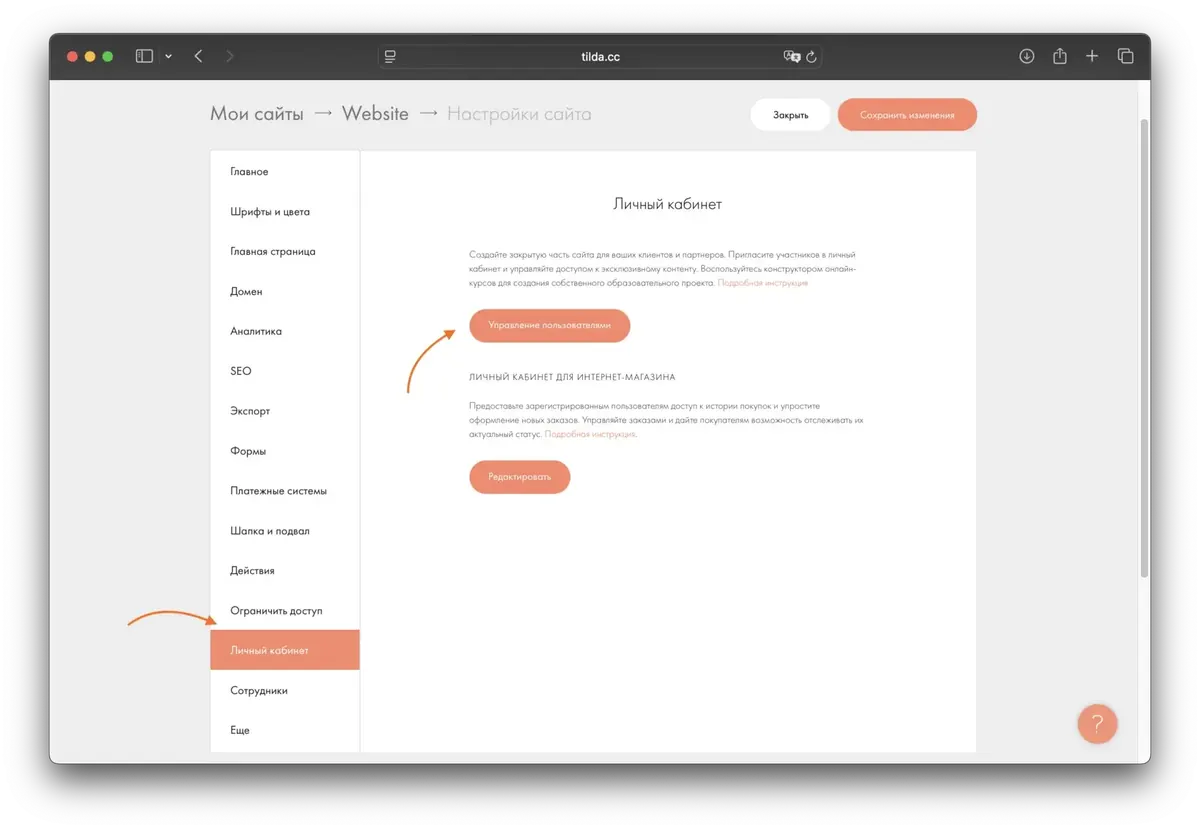
Menu: My sites → Site → Site settings → Personal account.
You arrive at the section for managing user access to private pages.
In addition, access can be controlled through the “Restrict access” option at the level of individual pages.
Step 2: Managing users
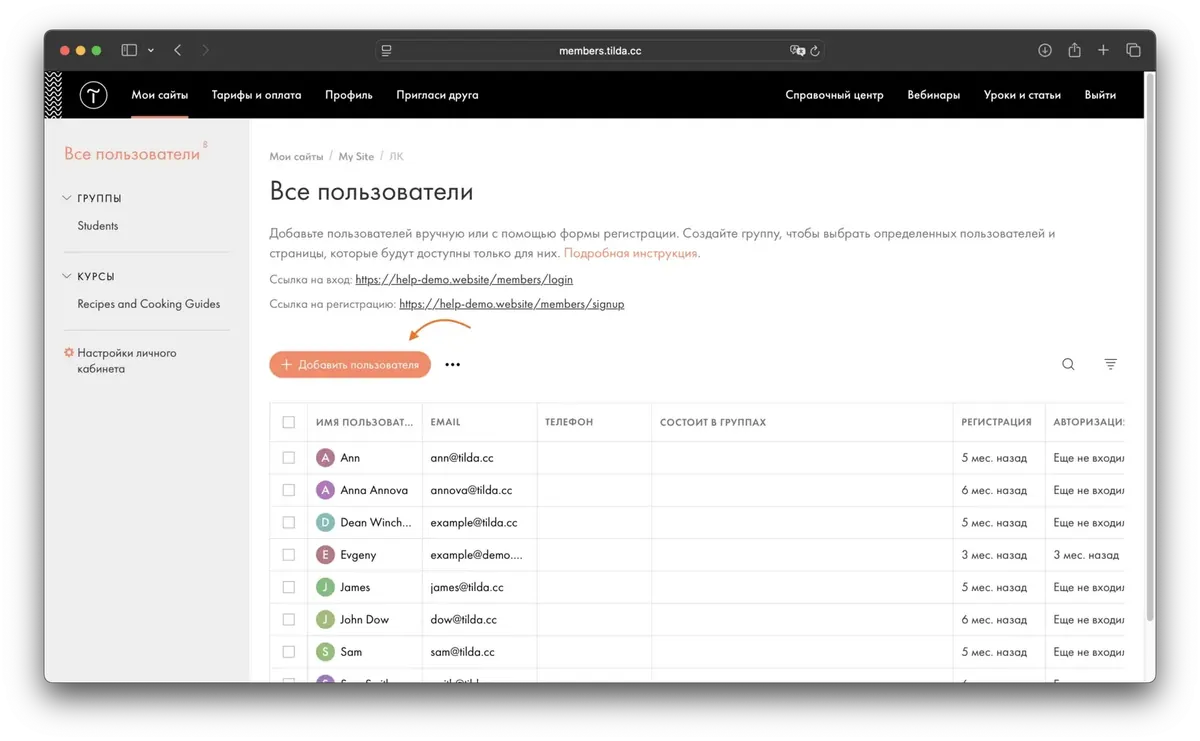
Click “Manage users” — the full Membership interface will open.
In Tilda you can grant access:
- to all registered users,
- to individual people,
- to groups of users (you create them yourself).
What capabilities Tilda’s personal account has
It is important to understand: a personal account on Tilda is not a full user account but only an access management system.
What you can do:
- hide part of the content from unregistered users;
- open access after registration or payment;
- send authorization links through mailings;
- link access to specific user groups;
- store user data in the profile.
What you cannot do:
- automate access for the subscription period (close it automatically when it ends);
- keep a purchase history;
- connect points, bonuses, cashback;
- show the order status;
- perform complex business logic;
- build a full online store with a personal account.
Put simply:
Tilda’s personal account suits mini-courses but does not suit online schools, marketplaces, CRM or stores with customer service.
When Tilda’s personal account is not enough
If you provide services, you need a personal account at least for:
- booking services,
- choosing a specialist,
- editing data,
- tracking orders,
- storing the history of requests.
But Tilda’s built-in personal account does not allow this functionality to be implemented. At most — “content for registered users”.
What to do if Tilda’s capabilities are not enough?
If you like your Tilda website and do not want to change it, there is a solution:
use a separate personal account on another platform and link it to a subdomain.
For example, Falcon Space is a platform that specializes in custom personal accounts.
Advantages of Falcon Space:
- flexible business logic (any processes);
- custom functions for a specific project;
- widgets, order processing, booking, chats, transactions;
- a one-time license purchase;
- data is stored with you;
- you can customize it yourself if you know SQL.
Comparison: Tilda vs Falcon Space
Features
Tilda personal account
Falcon Space personal account
Business logic
None
Customizable, flexible
Access management
Available, but limited
Fully custom
Widgets, tools
Almost none
Any integrations
Online store
Without a personal account
Full functionality
Possibility of improvements
Minimal
Any
How to connect an advanced personal account to a Tilda website
There is no direct integration, but the solution is simple:
- Tilda stays as it is.
- A personal account is created on Falcon Space.
- The personal account is placed on a subdomain such as:
- lk.site.kz
- A “Go to personal account” button is added on Tilda.
- All Tilda forms can send data to the personal account via webhooks.
For example:
The client paid → Tilda sent the data by webhook → a profile/order is created in Falcon Space → the client gets access.
Conclusions
A personal account on Tilda is only a tool for managing access to private content.
Suitable for:
- mini-courses,
- small products,
- private pages.
Not suitable for:
- online stores,
- full online schools,
- booking services,
- client accounts with transactions and order history.
If you need a full personal account, it is worth building it separately and linking it to a subdomain — this is simpler, cheaper and faster than creating a new website.


